Integrating Rose Amoure: A Practical Guide to Script Font Implementation
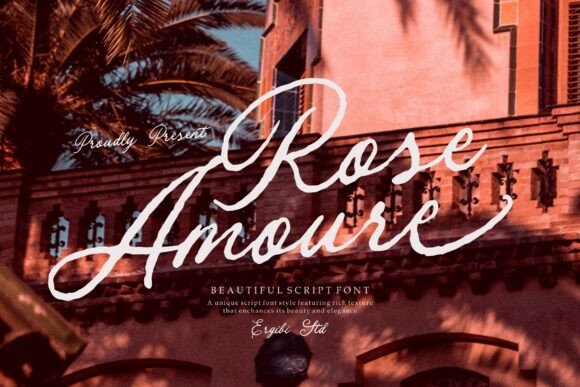
In the world of design and branding, typography is rarely a static asset; it is an active component of a workflow. Selecting a typeface like Rose Amoure, an elegant handwritten script font, is not merely an aesthetic decision but a strategic one that influences project timelines, file compatibility, and final output quality. While this font captures the essence of romance and refinement with its flowing strokes and graceful curves, its true value lies in how effectively it can be integrated into a professional production pipeline. Understanding the technical and creative nuances of Rose Amoure ensures that the "soft, feminine touch" it provides does not come at the cost of efficiency or readability.
Pre-Production and Font Assessment
Before incorporating Rose Amoure into a project, a critical evaluation phase is necessary. This involves assessing the font’s technical specifications against the project requirements. The first step in any workflow involving script fonts is to verify licensing and file formats. Ensure you have the appropriate license for the medium—whether digital web use or physical print—and that the font file is in a format compatible with your design software (e.g., .OTF or .TTF for desktop applications).
Once technical compatibility is confirmed, the creative assessment begins. Rose Amoure is characterized by "delicate details" and "smooth rhythm." In a planning stage, you must test these characteristics against your background textures and color palettes. A common pitfall is placing a script font with high contrast over a busy background, which negates its readability. During this phase, create a "type specimen" sheet—a single document that displays the font at various sizes and colors against your brand’s specific backgrounds. This allows you to gauge legibility before you are deep into the layout phase, saving valuable revision time later.
Typographic Hierarchy and Pairing
A typeface rarely stands alone; it interacts with other visual assets and font families. Rose Amoure is designed to be a display or accent font, ideal for headlines, sub-headlines, or call-outs, rather than body copy. Integrating it into a broader typographic hierarchy requires a balancing act. Because it has "artistic charm" and "flowing strokes," it demands a counterpart that is stable and clean—typically a sans-serif or a simple serif font for body text.
In your workflow, establish a pairing grid early on. If you are designing a wedding invitation or a luxury brand logo, use Rose Amoure for the primary emotional hook, such as the names or the tagline. Pair it with a geometric sans-serif for the details like dates, addresses, or descriptions. This contrast ensures that the "timeless and sophisticated feel" of the script enhances the content rather than cluttering it. When setting these rules, document the specific size ratios (e.g., the script headline is 150% of the body text size) to maintain consistency across different pages or social media assets.
Technical Implementation: Spacing and Kerning
One of the most labor-intensive parts of working with script fonts is the adjustment of spacing. Because Rose Amoure is crafted with "graceful curves," the default spacing provided by the software may not be perfect for every word. Script fonts often require tighter tracking than standard serif or sans-serif fonts to maintain the illusion of cursive handwriting.
During the execution phase of your project, do not simply type and move on. Zoom in and inspect the spacing between specific letter combinations. Look for awkward gaps or overlapping strokes that break the "natural, smooth rhythm." For example, the connection between a "b" and an "e" might look different than the connection between a "t" and an "h." Adjusting the kerning manually for key headlines or logo lockups is a standard quality control step. This manual fine-tuning is what separates amateur typography from professional design work, ensuring that the "refinement" promised by the font is actually delivered in the final file.
Application Across Different Mediums
The versatility of Rose Amoure allows it to function across various platforms, but the implementation strategy must adapt to the medium. The workflow for digital assets differs significantly from physical printing.
- Digital and Web Design: When using Rose Amoure for web headers or social media graphics, focus on screen resolution. Small, delicate strokes can disappear or become jagged on low-resolution screens. Ensure the font size is large enough to render the "delicate details" clearly. If using it for web design via CSS, utilize modern font-display strategies to ensure the page loads efficiently without layout shifts.
- Print and Packaging: For packaging and wedding invitations, the interaction with paper stock is paramount. Rose Amoure adds a "sense of luxury," but if printed on uncoated, absorbent paper, the ink might bleed, causing the fine strokes to fill in. In your pre-press workflow, perform a test print or request a proof. You may need to adjust the stroke weight or choose a coated paper stock to preserve the "elegance" and "warmth" of the design.
- Branding and Logos: When used for logos, vectorization is essential. Do not rely on the font file for the final logo asset. Convert the text to outlines (paths) once the design is approved. This ensures that the "flowing strokes" are preserved regardless of where the logo is opened, eliminating font-missing errors for future vendors or partners.
Efficiency in the Creative Process
Efficiency is key for professionals and entrepreneurs. To streamline the use of Rose Amoure, create reusable templates. If you are a blogger or a small business owner creating social media content, set up pre-designed templates in tools like Canva, Figma, or Adobe InDesign where the font is already applied with the correct sizing and color codes. This removes the decision fatigue of formatting every time you create a post.
Furthermore, consider the long-term organization of your assets. Create a "Brand Kit" file that includes Rose Amoure alongside your other approved fonts, color swatches, and usage guidelines. This document serves as a central reference for anyone involved in the project, from freelancers to marketing teams. By defining exactly how and where Rose Amoure should be used—whether for "editorial layouts" or "logos"—you maintain brand consistency and speed up the onboarding process for new team members or collaborators.
Quality Control and Final Review
Before finalizing any project, a comprehensive review process is required. Script fonts like Rose Amoure can sometimes cause issues with automated spell-checkers or accessibility tools. In a final review, check for the following:
- Accessibility: Ensure that the text remains readable for users with visual impairments. If the font is used for critical information (like a price or a date), verify that the contrast ratio meets accessibility standards. The "artistic charm" should not hinder the user's ability to access information.
- File Export: When exporting PDFs or packaged files, double-check that the font is embedded. If you are sending a file to a printer, they need the font data to reproduce the "graceful curves" accurately.
- Contextual Review: Step back and view the design at the intended size. A font that looks "sophisticated" on a large monitor might look like a smudge on a mobile phone screen. Adjust based on the primary viewing medium of your audience.
By treating Rose Amoure not just as a download, but as a component within a structured design system, you leverage its full potential. It becomes a reliable tool for conveying "beauty" and "warmth," executed with the precision and reliability required in professional creative work.