Kinder Bright: How to Use This Playful Font Without Looking Amateur
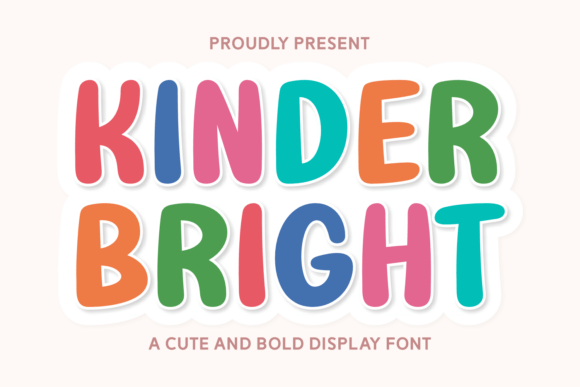
In the crowded world of design assets, finding a typeface that conveys genuine warmth without sacrificing professionalism can be a challenge. Enter Kinder Bright, a vibrant display typeface specifically engineered to spark joy and creativity. With its thick, rounded sans-serif letterforms and rhythmic, soft-edged structure, Kinder Bright captures a playful and innocent soul. It is the premier choice for independent daycare branding, children's toy packaging, primary school event posters, and high-impact social media headers. However, while the font radiates friendliness and approachability, using it effectively requires more than just a simple copy-paste approach. To truly leverage the cheerful personality of this chunky font, you must navigate the common pitfalls that turn a fun design into a chaotic mess.
The Danger of the "Toy Box" Aesthetic
One of the most frequent errors beginners and even seasoned designers make with display fonts like Kinder Bright is overcomplicating the visual hierarchy. Because the font features such a heavy structural weight and distinct personality, it demands breathing room. A common mistake is pairing Kinder Bright with other decorative or heavily stylized fonts. This creates a visual clash that is exhausting to look at and immediately cheapens the brand's perception.
When you choose Kinder Bright for a logo or a poster, you are making a statement. If you pair it with a script font or another chunky sans-serif for the body text, the design loses its focal point. The result is a "toy box" aesthetic—everything is screaming for attention, and nothing is actually being communicated. This affects the usability of your design, particularly for parents or educators who need to quickly extract information like dates, times, or contact details from a flyer.
A Better Approach to Font Pairing
To avoid this visual noise, you should treat Kinder Bright as the star of the show. It works best for headlines, logos, and short bursts of text where impact is key. For body copy, you need a partner that steps back and lets the display font shine.
- The Ideal Match: Pair Kinder Bright with a clean, neutral sans-serif font (like Open Sans, Lato, or Roboto) or a highly legible serif font for body text. The contrast between the playful, rounded edges of Kinder Bright and the clean lines of a standard sans-serif creates a professional balance.
- Check the Weight: Because Kinder Bright is chunky, ensure your body text has a lighter weight. This prevents the page from looking "heavy" and ensures the content remains easy to read for long-form explanations.
- Spacing Matters: Given the soft-edged structure of the letterforms, give Kinder Bright slightly more letter-spacing (tracking) than you might use for a standard geometric font. This allows the unique shapes of the letters to breathe, enhancing the friendly vibe.
Context is King: When Not to Use Kinder Bright
While the marketing copy for Kinder Bright highlights its utility for "fun-and-friendly" branding, a critical mistake is applying it to contexts where it does not belong. Just because a font is high-quality does not mean it fits every project. Using Kinder Bright for a serious corporate report, a luxury wedding invitation, or a minimalist tech startup will likely confuse your audience. It signals a disconnect between the brand's voice and its visual presentation.
For example, imagine a children's therapy center. While the service involves children, the parents are the decision-makers, and they are looking for trust and safety, not necessarily "playfulness." In this scenario, using Kinder Bright for the main logo might undermine the professional authority of the therapists. It is crucial to evaluate the tone of your project before selecting the font.
Defining the Appropriate Audience
Before you download or buy Kinder Bright, ask yourself who needs to be persuaded by this design. If you are targeting independent daycare branding or primary school event posters, the font is a perfect fit. Its rhythmic structure radiates the safety and joy parents associate with early education. However, if your audience is a B2B investor or a high-end service provider, you should steer clear of this typeface.
Consider the "vibe check" test: Does your product or service require a sense of whimsy? If the answer is a definitive yes, Kinder Bright is your tool. If the answer is "maybe" or "no," opt for a typeface with a more neutral personality.
Technical Oversights: Sizing and Scalability
A distinct characteristic of Kinder Bright is its thick, rounded sans-serif style. While this looks fantastic on a large scale, such as a social media header or a billboard, it can present challenges at smaller sizes. A common mistake is using this font for footer text, disclaimers, or fine print. Because the letterforms are bold and the negative space inside the letters (counters) is relatively small compared to the stroke weight, the text can fill in and become unreadable when scaled down.
This affects the quality of your communication. If a parent cannot read the phone number on a flyer because the font is too thick and small, you lose a lead. Always test your designs at the actual size they will be viewed. If you are printing a business card, print a test sheet. If you are designing a mobile header, view it on a phone screen, not just a desktop monitor.
Color and Contrast Considerations
Another overlooked detail is how Kinder Bright interacts with color. Because the font has a "rhythmic, soft-edged structure," it absorbs a significant amount of ink or pixel space. Using this font in a solid dark color on a solid dark background will result in a muddy, indistinguishable blob. Conversely, using a very thin weight (if available) in a light color on a white background will fail to capture the font's intended high-impact energy.
To maximize the font's effectiveness:
- High Contrast is Key: Use Kinder Bright in high-contrast situations. Think white text on a vibrant primary color background, or a bold dark color on a pastel background. This highlights the "bright" aspect of the font.
- Avoid Gradients on Small Text: While gradients can look fun, applying them to the chunky letterforms of Kinder Bright at small sizes can create visual artifacts. Keep the color application clean and solid for maximum readability.
- Consider the "Glow": Due to the rounded edges, the font can sometimes appear to "glow" or bleed slightly on low-resolution screens. Ensure you are using high-quality assets and standard web-safe rendering techniques to keep the edges crisp.
Finalizing Your Decision
Choosing a typeface is a decision that affects your entire brand identity. Kinder Bright is an exceptional tool for capturing a specific emotional frequency—one of innocence, energy, and friendliness. By avoiding the mistake of over-pairing, respecting the context of your audience, and managing the technical aspects of weight and size, you ensure that the font works for you, not against you.
When you are ready to implement Kinder Bright, take the time to experiment. Lay out a full mockup of your intended design—whether it is a toy package or a social media banner—and look at it with fresh eyes. Does it communicate joy? Is it legible? Does it feel professional yet fun? If the answer is yes, you have found the right tool to bring your creative vision to life.