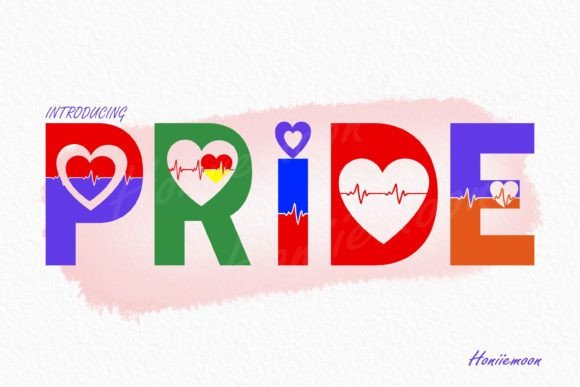
Pride: Integrating a Vibrant Display Font into Professional Workflows
In the landscape of modern design and content creation, typography serves as a critical tool for communication. While body text relies on readability, headers and display elements require a distinct visual voice. Pride is a display font designed to fill this specific role. It is characterized by its bold, colorful, and "jolly" aesthetic, offering a combination of cuteness and impact. However, integrating a specialized asset like Pride into a professional workflow requires more than just a creative eye; it demands a structured approach to file management, compatibility, and design consistency.
Understanding the Asset: What Pride Brings to the Table
Before implementation, it is essential to define the utility of the asset. Pride is not a workhorse font for long-form text; its primary function is to act as a visual anchor. Its design features rounded edges and a playful tone, making it suitable for contexts that require a friendly, approachable, or celebratory atmosphere. The font is designed to "enhance designs" by drawing attention immediately, serving as the focal point of a composition.
From a technical standpoint, the font is PUA (Private Use Areas) encoded. For the end-user, this is a significant workflow consideration. PUA encoding ensures that specific stylistic alternates, ligatures, and glyphs are accessible even in basic text editors that do not support advanced OpenType features. This means a designer can access the full range of the font’s character set without needing to navigate complex software panels, streamlining the implementation process across various platforms.
Strategic Planning: Where Pride Fits in the Process
Integrating a display font effectively requires a strategic assessment of the project's goals. Pride should be introduced during the ideation and planning phase of a project, specifically when defining the visual hierarchy.
Pre-Project Assessment
Before selecting Pride for a project, creators should evaluate the tone of the message. Because the font is described as "cute and jolly," it is best suited for specific niches:
- Marketing Collateral: Promotional materials for sales, events, or seasonal campaigns where energy and excitement are required.
- Digital Content: Thumbnails for video content, podcast cover art, or social media graphics that need to stop the scroll.
- Packaging Design: Product labels for lifestyle brands, children’s products, or artisanal goods where a hand-crafted feel is desired.
- Event Branding: Invitations, flyers, and banners for parties or community gatherings.
If the project involves legal documents, technical manuals, or serious corporate reporting, Pride would likely be an inappropriate choice. Successful implementation begins with matching the font’s personality to the project's intent.
Workflow Integration: From Installation to Execution
The practical application of Pride involves a series of steps that ensure the asset functions correctly within the broader design ecosystem. This process moves from technical setup to creative application.
File Management and Installation
The first step in any workflow is organization. When the font files are downloaded, they should be unzipped and categorized within a dedicated font management system or a structured folder on the operating system. For users on Windows or macOS, installing the font involves right-clicking the file and selecting "Install" or using a font management tool like Font Book or NexusFont.
Because Pride is a display font, it may come with multiple stylistic sets. Organizing these files clearly ensures that when a designer switches between projects, they can locate and activate the specific version of Pride they need without disrupting their creative flow.
Software Compatibility and PUA Access
Once installed, Pride is ready for use in vector and raster software such as Adobe Illustrator, Photoshop, or Affinity Designer. The key workflow advantage of its PUA encoding is the ease of accessing special characters.
In a typical workflow, a designer might type out a headline. If the default characters feel too standard, the designer can access the "Glyphs" panel within their software. Because the font is PUA encoded, all decorative elements are visible and selectable. This allows for rapid iteration; a designer can swap a standard "A" for a stylistic alternate without searching through complex code blocks, keeping the creative momentum going.
Practical Application: Enhancing Design Compositions
With the font installed and accessible, the focus shifts to composition. The goal of using Pride is to make a design "come alive," but this must be balanced with legibility and hierarchy.
Establishing Visual Hierarchy
Pride is most effective when used for primary headers or focal text. In a layout, it should command the most attention. A practical approach is to pair Pride with a clean, neutral sans-serif font for body text. This contrast ensures that the display font remains the star of the show while the supporting text remains readable.
For example, in a blog header or poster:
- Primary Headline: Use Pride in a bold weight or with stylistic alternates to set the mood.
- Sub-headline: Use a complementary sans-serif to provide context or a date.
- Body Text: Use a standard font to ensure the main message is delivered clearly.
Color and Texture
Given that the font description mentions it is "colorful," designers should consider how the font interacts with the background. Pride works well on solid backgrounds where the letterforms can pop. However, if the font file itself contains color data (a feature available in some modern font formats), it should be placed on a neutral background to avoid visual clutter. If it is a standard vector outline, applying vibrant gradients or textures to the text can enhance the "fun" factor.
Optimization and Quality Control
As with any design asset, quality control is a necessary final step before publishing or printing.
Scalability Check
Display fonts can behave differently at various sizes. A crucial step in the workflow is to test Pride at the intended output size. At large sizes, the "cute" details and ligatures should be crisp. At smaller sizes, some of the intricate details might become illegible. If the font is to be used for a logo, vectorizing the text (outlining it) ensures that the design remains consistent across all applications, from a favicon to a billboard.
Flattening and Exporting
When finalizing a project for print or sending files to a collaborator who may not have the font installed, it is best practice to outline the text. In Adobe Illustrator, this is done via Type > Create Outlines. This converts the editable text into vector shapes, preserving the exact appearance of Pride and preventing font substitution errors during the export process.
Long-Term Use and Brand Consistency
For freelancers and small business owners, the decision to use Pride extends beyond a single project. If the font resonates with the brand's voice, it should be documented in a Brand Style Guide.
Documenting the use of Pride involves specifying:
- Where the font should be used (e.g., "Headlines only").
- Which specific ligatures or alternates are part of the brand identity.
- Approved color pairings.
By codifying these rules, creators ensure that whether they are designing a social media post today or a website banner six months from now, the application of Pride remains consistent. This consistency builds brand recognition and ensures that the "jolly" and "bold" character of the font becomes synonymous with the creator's professional identity.
Conclusion
Pride is more than just a collection of glyphs; it is a tool for injecting personality into digital and print media. By understanding its technical capabilities—specifically its PUA encoding—and applying it within a structured workflow, professionals can leverage this font to create designs that are not only visually appealing but also strategically effective. The key to success lies in preparation, proper pairing, and consistent application, ensuring that the font enhances the message rather than overwhelming it.