Lemon Days: Integrating Playful Typography into Professional Workflows
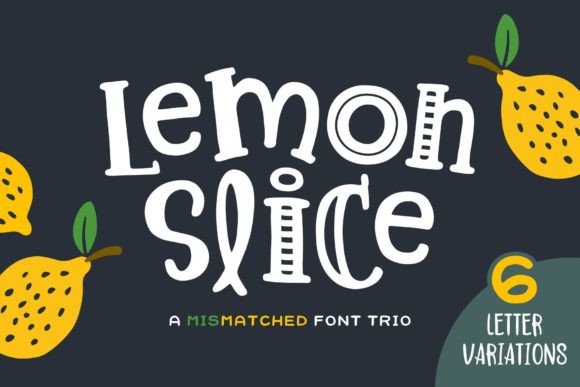
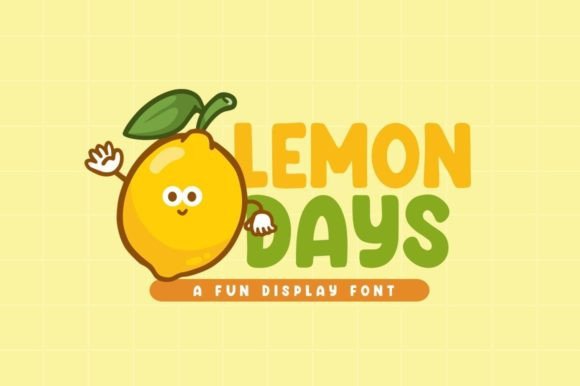
In the landscape of digital design, typography is not merely a vessel for words; it is a signal of intent. The font you choose dictates the emotional temperature of your project before a single sentence is read. While serif fonts often command authority and sans-serifs suggest modern efficiency, display fonts serve a specific, strategic purpose: they capture personality. Lemon Days is a prime example of a display font that bridges the gap between whimsical charm and professional utility. It is a fun, cool, and distinctly playful typeface designed to inject energy into visual communications. However, knowing when and how to deploy a font like Lemon Days within a structured workflow is what separates amateur design from professional execution.
Understanding the Role of Lemon Days in Design Systems
Before integrating any asset into a project, it is necessary to define its function. Lemon Days falls into the category of decorative or display typography. Unlike body copy fonts, which are designed for legibility at small sizes over long paragraphs, Lemon Days is engineered for impact. Its value lies in its ability to evoke a specific mood—in this case, joy, approachability, and creativity. This makes it a specialized tool in a designer’s toolkit, rather than a universal solution.
In a broader design system, fonts are usually categorized by hierarchy. You have your primary headers, sub-headers, and body text. Lemon Days occupies the top of that hierarchy. It is the voice of the headline, the logo, or the call-to-action button. Its interaction with other assets is defined by contrast. To maximize its effectiveness, Lemon Days should be paired with a clean, neutral font for body text. This contrast ensures that the playful nature of the headers does not overwhelm the reader, maintaining the necessary balance between engagement and readability.
Pre-Project Planning: Identifying the Right Context
The implementation of Lemon Days begins not with the design software, but with the project brief. The decision to use a playful font should be a strategic one, driven by the target audience and the project goals. This font is particularly effective for specific demographics and industries. If your workflow involves creating materials for children’s education, cartoon branding, party invitations, or casual lifestyle blogs, Lemon Days is a strong candidate.
During the planning phase, conduct a "tone check." Does the project require a serious, corporate tone? If the answer is yes, Lemon Days might be reserved for internal brainstorming materials or specific, playful sub-campaigns rather than the main corporate identity. However, for entrepreneurs and small business owners looking to differentiate themselves from stiff corporate competitors, Lemon Days can be a strategic asset. It signals to the customer that the brand is human, friendly, and accessible. This pre-project decision-making process prevents wasted time later and ensures that the typography supports the overall message rather than conflicting with it.
Practical Implementation: Workflow and Integration
Once the decision to use Lemon Days is made, the focus shifts to practical execution. Integrating a new font into an existing workflow requires attention to technical compatibility and file management. For freelancers and agencies, font licensing is the first checkpoint. Ensure that the license for Lemon Days covers your intended use cases, whether for digital web use, print merchandise, or video production.
From a technical standpoint, Lemon Days interacts best with software that supports OpenType features, such as Adobe Illustrator, Photoshop, or Canva. When importing the font, take time to explore its full character set. Display fonts often include stylistic alternates or ligatures—alternative versions of letters that can be swapped out to add variety or improve the flow between specific letter combinations. Utilizing these features is part of an efficient workflow; it allows you to customize the typeface so that it doesn't look generic, even if other designers are using the same asset.
Workflow Example: The Brand Identity Project
Consider a scenario where you are developing a brand identity for a new line of organic lemonade or a children’s activity center. The process would likely unfold as follows:
- Conceptualization: Sketch out logo ideas using Lemon Days to see how the letterforms interact with potential iconography.
- Digital Drafting: Import the font into a vector editor. Adjust the kerning (the space between individual letters) to ensure the playful loops and curves of the font sit comfortably next to one another.
- Application: Apply the font to the primary logo and headline text on the website. Pair it with a legible sans-serif like Montserrat or Open Sans for the "About Us" and product description sections.
- Asset Creation: Use the font to create social media templates. Because Lemon Days is visually distinct, it creates an immediate brand recognition pattern in a user's feed.
Optimizing for Digital and Print Environments
One of the most common pitfalls in using display fonts is failing to test them across different environments. A font that looks charming on a high-resolution monitor may lose its detail when printed on low-quality paper or viewed on a mobile screen. When implementing Lemon Days, quality control is essential.
For digital workflows, specifically web design, pay attention to font weight and load times. While Lemon Days is likely optimized for web use, decorative fonts can sometimes be heavier than standard system fonts. If you are using it for a website header, ensure it is converted to a web-friendly format (like WOFF2) to maintain site speed. Test the font on mobile devices; the playful curves that look great on a desktop banner might become cluttered or unreadable on a small smartphone screen if the font size is too small.
In print workflows, such as designing flyers or merchandise, the interaction between ink and paper matters. The whimsical nature of Lemon Days often features varying stroke widths or decorative elements. On uncoated paper, ink can bleed, causing fine details to merge. Always request a proof or test print to ensure the font remains crisp. This attention to detail during the execution phase ensures that the final product retains the intended playful quality.
Long-Term Use and Brand Consistency
For creators and business owners, a font is not just a one-time tool; it becomes part of a brand’s DNA. If you choose to adopt Lemon Days as a primary display font, it must be documented in your brand style guide. This guide should specify exactly where and how the font is used. For example, you might dictate that Lemon Days is used only for H1 headers and marketing slogans, while a secondary font handles all other text.
This level of organization ensures consistency across all platforms, whether you are the one creating the content or if you hand the work off to a virtual assistant or a new team member. Over time, this consistency builds trust with your audience. They begin to associate the specific, friendly aesthetic of Lemon Days with your brand’s voice.
Conclusion: The Strategic Value of Personality
Ultimately, integrating Lemon Days into your workflow is about more than just picking a "cool" font. It is a strategic decision to inject personality and warmth into your communications. By following a structured process—identifying the right context, managing technical implementation, ensuring cross-platform legibility, and maintaining brand consistency—you can leverage this playful typeface to connect with your audience on an emotional level. Whether you are launching a new product, designing a game, or refreshing a blog, Lemon Days offers a distinct voice that can make your work stand out in a crowded digital landscape.