Albert: Integrating a Bold Display Typeface into Professional Workflows
Understanding the Functional Role of Albert in Design Systems
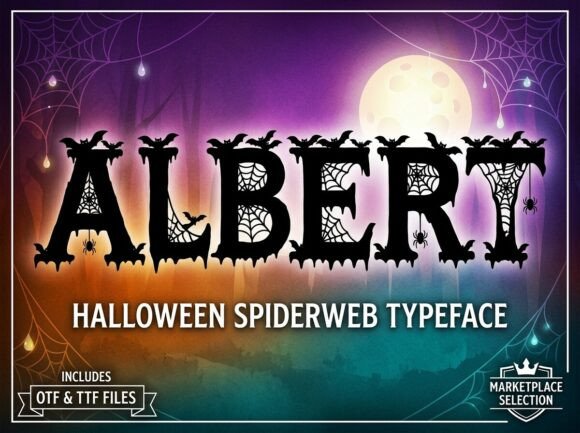
When selecting typography for a project, the choice extends beyond mere aesthetics; it is a critical component of the user experience and brand communication. Albert is a specific category of typeface known as a decorative display font. To effectively integrate it into a professional workflow, one must first understand its constraints and capabilities. Unlike standard body text fonts such as serif or sans-serif families designed for long-form reading, Albert is engineered for high-impact visual moments. It functions as a specialized tool within a broader design ecosystem, intended to capture attention and establish a distinct personality immediately.
The primary characteristic of Albert is its classification as an ALL-CAPS typeface. This is a significant operational detail that influences how it interacts with other design elements. Because it lacks lowercase letters, it cannot be used for general-purpose writing or extended paragraphs. Instead, it occupies a specific niche: headlines, logos, and decorative initials. In a comprehensive design strategy, Albert serves as the anchor for visual hierarchy. It draws the eye, while secondary typefaces handle the heavy lifting of information delivery. Understanding this division of labor is the first step in planning a cohesive layout.
Technical Integration and File Management
A smooth creative process relies heavily on technical compatibility and asset management. Albert is delivered in two industry-standard formats: OTF (OpenType Font) and TTF (TrueType Font). Knowing when to use which file is essential for maintaining efficiency and quality control.
The OTF file is the professional standard, particularly for advanced design and layout software such as Adobe Illustrator, InDesign, and Photoshop. It offers superior typographic features and scalability, making it the preferred choice for print-ready materials and high-resolution digital assets. The TTF file ensures universal compatibility, which is crucial when working across different operating systems or sharing assets with clients who may not have professional design suites. For web implementation or use in standard office environments, the TTF format provides the necessary stability.
Workflow Implementation: Preparation and Setup
Before initiating a design phase, proper font installation is a prerequisite. This involves organizing the downloaded files in a central asset library. For teams, this means ensuring the font is installed on all relevant workstations to prevent "missing font" errors, which can disrupt the production timeline. A practical tip for project management is to document the specific use case for Albert within the project style guide. By defining that Albert is strictly for H1 headers or logo marks, you prevent the common error of overusing display fonts, which can lead to visual clutter.
Strategic Application in Creative Processes
Integrating Albert effectively requires a shift in perspective from writing to designing. Because the font is "ALL-CAPS," the text must be crafted to fit the medium. This impacts the copywriting stage. Writers and editors working alongside designers should understand that headlines using Albert need to be concise. Long sentences set in all-caps display type can be difficult to read and lose their visual punch. Therefore, the workflow involves a collaborative loop where copy is trimmed and refined to suit the typographic constraints.
Use Cases: Branding and Packaging
In the context of branding, Albert excels at creating a "strong visual personality." When designing a logo or brand mark, the font acts as the foundational element. The workflow here involves pairing Albert with a neutral, complementary typeface for body text. This contrast ensures legibility while allowing the brand identity to stand out. For creative packaging, Albert can be used to highlight product names or key selling points on the shelf. The implementation process involves testing the font at various scales to ensure the "artistic elements" remain crisp, whether on a small business card or a large banner.
Use Cases: Digital Marketing and Social Media
For marketers and content creators, Albert serves as a tool for stopping the scroll. In social media graphics or email headers, the unique character of the font commands attention. The practical application involves creating templates where Albert is the fixed variable. For example, a marketing team might create a series of Instagram stories where the headline is always set in Albert, and the supporting information is in a standard sans-serif. This creates consistency and speeds up the content creation process, as the visual hierarchy is already established.
Quality Control and Long-Term Usability
Using a stylized font like Albert requires a rigorous quality control phase. Because every letter is described as a "work of art," the kerning (spacing between characters) and tracking must be reviewed carefully. Display fonts often require manual adjustment to ensure optical balance, especially in logos. This is a manual step in the workflow that cannot be skipped if the goal is a "professional and polished finish."
Furthermore, accessibility is a key consideration. Since Albert is a decorative typeface, it should not be used for critical user interface elements or body text where readability is paramount. In web design, this means ensuring that screen readers can interpret the text correctly, and that the font is not the sole carrier of essential information. The long-term usability of the font depends on using it sparingly and appropriately. Overuse can dilute its impact and fatigue the audience.
Conclusion: Elevating the Ordinary
Ultimately, Albert is a specialized asset designed to help creators "break away from the ordinary." Its value lies in its ability to inject energy and distinctiveness into a project. By treating it as a strategic tool—understanding its file formats, respecting its all-caps limitation, and applying it to specific high-impact areas—professionals can streamline their creative process. Whether used in a logo design, a marketing campaign, or a creative packaging project, Albert provides the visual personality needed to make a lasting impression, provided it is integrated with planning and precision.