Lytta: Elevate Your Creative Projects with a Bold Display Typeface
In the crowded world of design, finding a typeface that commands attention without sacrificing elegance is a significant challenge. Lytta is a decorative display font designed specifically to be the centerpiece of any layout. With its distinct artistic elements and strong character, it is an excellent tool for creators who want to break away from the ordinary. Whether you are crafting bold headlines, developing unique branding, or designing premium packaging, Lytta delivers a high-end, professional aesthetic that resonates with personality. However, choosing a display font is just the first step; understanding how to use it effectively is what separates amateur work from professional design.
Understanding the Nature of a Display Font
Before integrating Lytta into your workflow, it is vital to understand its classification. This is not a standard body text font. Display typefaces are engineered for impact at large sizes, such as on posters, banners, or website headers. Lytta features artistic flourishes and distinct shapes that are designed to catch the eye immediately. Because of these decorative elements, using it for small, dense paragraphs would render the text illegible and frustrating for the reader. The primary function of this font is to act as a visual anchor—a focal point that guides the viewer's attention.
A Common Pitfall: The All-Caps Limitation
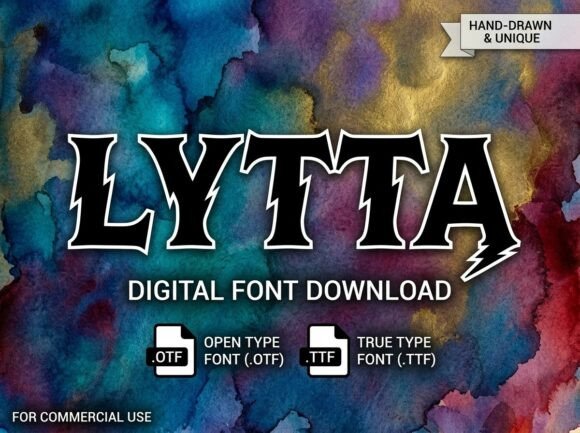
One of the most frequent misunderstandings regarding Lytta is its character set. It is an All-Caps display typeface. By design, it does not contain lowercase letters. For many beginners, this can be surprising when they attempt to type a sentence and realize the case does not change. This is not a technical error or a missing file; it is a deliberate stylistic choice to create a uniform, powerful look for logos, titles, and decorative initials.
If you attempt to use Lytta for a paragraph that requires sentence case or camel case, you will run into immediate usability issues. The lack of x-height variation means the "sentence" will look like a block of shouting text. To avoid this, reserve Lytta for short, high-impact phrases. Think of it as a spice in a recipe—essential for flavor, but overwhelming if used as the main ingredient. Better approaches include using Lytta for the main title of a poster and pairing it with a neutral sans-serif for the subtitle or date.
Technical Compatibility and File Formats
When you purchase or download Lytta, you will typically receive two primary file formats: OTF (OpenType Font) and TTF (TrueType Font). A common mistake among users is installing the wrong format for their specific software, leading to crashes or missing typographic features.
- OTF File: This is the industry standard for professional design software like Adobe Illustrator, Photoshop, or InDesign. It supports advanced typographic features such as ligatures (special character combinations) and kerning adjustments. If you are a professional designer, this is the file you should install.
- TTF File: This format ensures seamless performance across all operating systems, including older versions of Windows and macOS. It is generally best for web use or if you are using standard office software that does not support advanced OpenType features.
If you install the TTF version when you actually need the ligatures available in the OTF version, you might spend hours troubleshooting why your design doesn't look like the promotional images. Always check your software’s requirements before installing. For most creative professionals, starting with the OTF file is the recommended path to ensure full access to Lytta's artistic capabilities.
Practical Advice for Application
To get the most out of Lytta, you must approach your design with intentionality. One major error is "visual noise," where a decorative font competes with other loud elements in the layout. Since Lytta has strong character, it requires breathing room.
Spacing and Hierarchy
When using Lytta for headers, pay close attention to tracking (letter spacing). Decorative fonts often benefit from slightly increased spacing to let the intricate details of the letters shine. Conversely, cramming the letters too close together can make the text look muddy and difficult to read, especially at smaller display sizes.
Furthermore, establish a clear hierarchy. If Lytta is your hero font, do not pair it with another decorative font. This creates a visual conflict where the viewer doesn't know where to look. Instead, pair Lytta with a clean, geometric sans-serif. This contrast allows the personality of Lytta to stand out while maintaining a clean, professional structure for the rest of the information.
Evaluating Before You Commit
Before finalizing a design project with Lytta, take a moment to evaluate the context. Ask yourself if the tone of the font matches the message. Lytta is excellent for creative branding, fashion, luxury goods, and artistic endeavors. However, it might not be the best fit for corporate financial reports or highly technical documentation where clarity is the absolute priority.
Additionally, always test the font at the size it will be viewed. A design that looks stunning on a high-resolution monitor might lose detail on a small mobile screen or a low-resolution print. By testing early, you can adjust the size or spacing to ensure the message remains clear and impactful across all mediums.
Conclusion
Lytta is a powerful asset for any designer looking to inject personality and high-end aesthetics into their work. By understanding its All-Caps nature, selecting the correct file format for your software, and applying it with proper hierarchy and spacing, you can avoid common pitfalls. Treat Lytta as a specialized tool for your boldest ideas, and it will consistently elevate your creative projects.